The team is now working on the WordPress Interactivity API. This unblocks the same UX Frontity framework enabled but directly in WordPress Core, fully compatible with the new Site Editor.
I’m just getting started with React and Frontity. I’m trying to build a theme but I need to be sure of how I should handle page building.
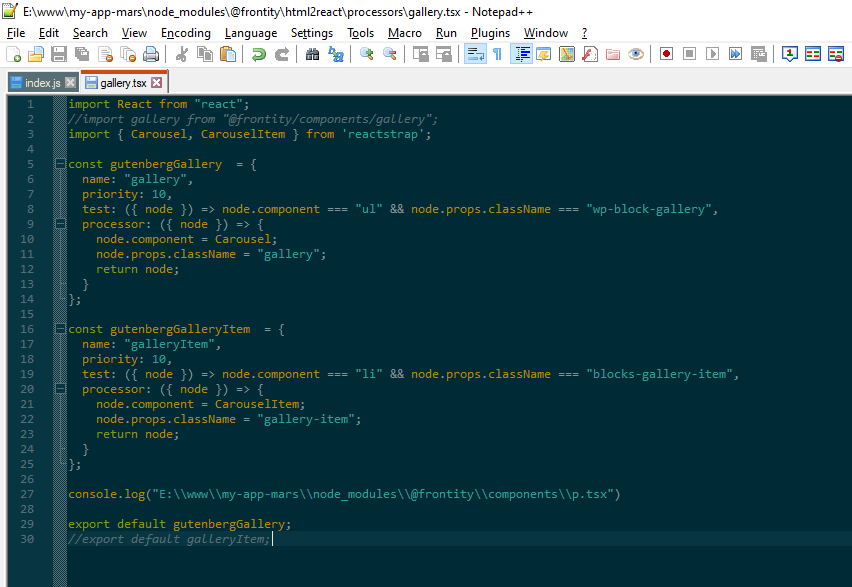
So far, I’ve come to the conclusion that the best way to build the pages that Frontity will get is with Gutenberg, however I can’t seem to find a lot of resources regarding this. So far, this topic (more specifically @luisherranz 's answer with the Gallery example and https://docs.frontity.org/api-reference-1/frontity-html2react have been my main sources of information, but I still have some questions.
For example, I’m trying to build a Component to handle the .wp-block-quote Gutenberg block. This block, specifically renders like this:
<blockquote class="wp-block-quote">
    <p>No more of this</p>
    <cite>Some guy said this</cite>
</blockquote>
I’m glad you found out the solution.
I’ve used this use case to prepare a demo as an example of how to create (and use) a custom processor
filipe7
@juanma Thanks!! I’m glad my question can help others! Maybe this https://docs.frontity.org/api-reference-1/frontity-html2react#create-your-own-processors should have another example? Because the Image Processor example doesn’t cover a lot of use cases, including those such as this one, where you want to pass the “processed” html into multiple different places inside the Component.
You are probably missing the CSS styling for this. I added the Gutenberg stylesheet locally to my project to make the default Gutenberg blocks work somewhat.
I think Frontity is working on something better but that is not available at the moment: Gutenberg Package
These processors are defined by a pattern that will be looked for the HTML and a React component that will be returned instead of every piece of HTML that matchesthe pattern
Hope this helps
2 Likes
shaun12
Hello.
Nice video re. processors. Could you clarify one thing for me?
If I have the default style for a blockquote set via Global.
Then I want to apply styling overrides to the elements with a class, is there a way to perform more than one test on the element or do I need to create a separate processor file for each match?
test expects a function which will receive each component (each tag) with its props (its attributes).
This function returns a boolean value, so inside this function you can perform any operation and comparison as long as the function returns a boolean value that reflects the matching pattern you want for that processor
In a more verbose way, this processor could be defined as…
I think @shaun is trying to return different components depending on the className, which is a different situation from what you are describing @juanma
juanma16
in that case, yes, you need a processor for every component you want to return.
shaun17
OK, thanks for the input…
I’ve had a play this morning, I’m close but no cigar!