The team is now working on the WordPress Interactivity API. This unblocks the same UX Frontity framework enabled but directly in WordPress Core, fully compatible with the new Site Editor.
I came here from wordpress. Been doing websites for years ONLY with wordpress. Im not really a programmer, and im not familiar with this npm stuff.
But this frontity looks interesting, decided to try it out.
I have already installed Node.js as requested. And I tried to create a project, it says something like this
Error: EPERM: operation not permitted
can you advice me on this matter.
juanma3
Hi @stivweng,
Welcome to the Community Forum!
Can you please copy and paste the command you’re launching in the terminal along with the full error?
Can you also copy and paste the result of doing npx frontity info?
stivweng5
Hello Juanma,
Thanks for replying to a newbie like me (LOL)
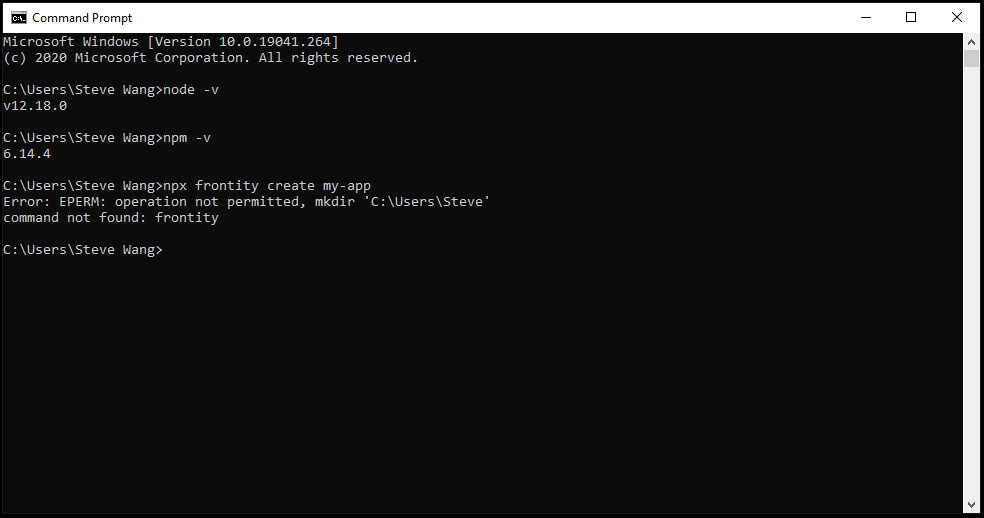
so here is the full error when i typed in the command npx frontity create my-app
Attached is screenshot
Our best guess is that npm doesn’t have the write permission in some directory where it is trying to download the frontity package (which causes the EPERM error).
And subsequently npx cannot find the frontity package because it has not been downloaded (which causes the command not found: frontity )
juanma14
@stivweng
here you have another thread in our Community Forum where you can find a solution for this issue
stivweng16
hmm seems like none of it working for me
mmczaplinski17
@stivweng Could you specify what exactly have you tried?
stivweng18
well. first i did what i had to as requested in the requirements,
and then I proceed to start my first project, and it says error as mentioned above. I tried that npm cache too. but it didnt work.
Just wondering, does it have to do with windows firewall?
mmczaplinski19
It’s possible but it’s really hard to say if it has anything to do with windows firewall without more context
This is why I’ve asked if you can share the specific steps that you’ve tried (what command did you type? what actions did you take, etc?) so that we could know what we could rule out.
The more information you can provide, the better we are able to help you
Pablo20
Hello @stivweng did you try to run your project outside your C:\Users\Steve Wang folder? It really looks like the problem you were facing in your screenshot was related with the folder name
containing an space.
stivweng21
Im so sorry,
Well after I installed node, i start with this command npx frontity create my-app
and the problem starts from there.
omg. i love this community already !
stivweng22
Hello Pablo,
No I havent,
Should I give it a try?
Im sorry, Im a beginner, LOL, But I would love to try this Frontity.
mmczaplinski23
Hey @stivweng, yep you should try it because we’re pretty sure that this is the problem Another user had the same issue before.



 Another user had the same issue before.