The team is now working on the WordPress Interactivity API. This unblocks the same UX Frontity framework enabled but directly in WordPress Core, fully compatible with the new Site Editor.
As we are releasing new versions of the framework really often, I think it would be interesting to create a guide explaining how to update frontity and its packages.
Yeah sure, I think it is a great idea! I will add how to update Frontity, a specific package, and check which ones are outdated. As I understood the command npm outdated is for this right @luisherranz? Will it be the best way if your packages are updated?
luisherranz4
This is a great idea. Many people coming from WordPress won’t know how to update npm packages.
If I’m not mistaken the only thing you would ever need once we launch the 1.0.0 version is npm update.
luisherranz5
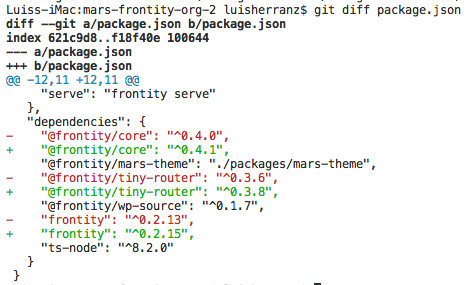
Yes, that’s right. npm update updates the package.json with the latest compatible versions:
So npm update it is
If you wan to update only one, you can do it with:
npm update my-package
SantosGuillamot6
Thanks @luisherranz!
Just another question: I guess that is also a good practice to keep updated Node and maybe the PHP version of your WordPress right? I was thinking of recommending it on the guide but I am not sure if it makes sense.
Feel free to share your feedback or even update it yourselves
1 Like
luisherranz8
Although keeping PHP and/or Node update is a good practice is always not really important for Frontity development and I’d rather invest time in creating other guides more related to Frontity at this stage.