The team is now working on the WordPress Interactivity API. This unblocks the same UX Frontity framework enabled but directly in WordPress Core, fully compatible with the new Site Editor.
please can anyone check my the above code? I need to get the ACF values of another page.
so I made my 2 method codes.
my above code is correct and professional? if not, please teach me quickly.
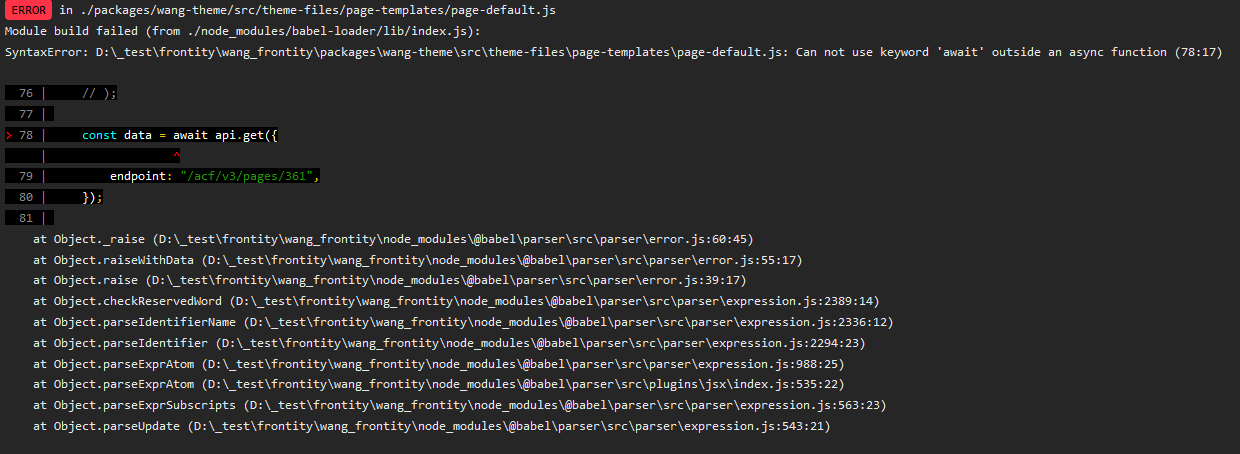
because when I used guide code, I got errors like the following.
const data = await api.get({
    endpoint: "/acf/v3/pages/361",
});
@forevereffort are you using the ACF to REST API plugin? If you use that, you just need to do post.acf and you’ll get your fields.
juanma5
Hi @forevereffort,
an improvement over your code could be using the to NPM package to properly handle the possible errors got when on the await sentences
import React, { useEffect } from "react";
import to from 'await-to-js';
import { connect } from "frontity";

const PageDefault = ({ state, actions, libraries }) => {
    const data= state.source.get(state.router.link);
    const page = state.source[data.type][data.id];

    useEffect(() => {
        async function getPageACF(){
            let err, res, resData;
            [ err, res ] = await to(libraries.source.api.get({
                endpoint: '/acf/v3/pages/361'
            }));
            if(!res) {
                console.error('No response returned from get. Please check the endpoint is correct');
                console.error(err)
            }

            [ err, resData ] = await to(res.json())
            if(!resData) {
                console.error('Error getting JSON from res. Please check the endpoint is returning a proper JSON');
                console.error(err)
            }
            // at this point everything should be OK
            console.log(resData);
        }

        getPageACF();
    }, []);

    return (
        <>
            <h1>{page.title.rendered}</h1>
            <h3>Default Page Template</h3>
            <div dangerouslySetInnerHTML={{__html : page.content.rendered}} />
        </>
    )
}

const connectedPageDefault = connect(PageDefault);
export { connectedPageDefault as PageDefault};
In this way, you’ll be able to detect more easily where the problem is
It may be, as @david1 says, that the use of ACF to REST API plugin is making the ACF data to be available somewhere else