The team is now working on the WordPress Interactivity API. This unblocks the same UX Frontity framework enabled but directly in WordPress Core, fully compatible with the new Site Editor.
⬢ my-frontity-project master ⦾ heroku addons:create edge:hobby
› Warning: heroku update available from 7.25.0 to 7.39.3.
Creating edge:hobby on ⬢ mighty-badlands-59259... $5/month
Successfully configured https://d19mgjkbf05ovs.cloudfront.net
Created edge-graceful-46203 as EDGE_AWS_ACCESS_KEY_ID, EDGE_AWS_SECRET_ACCESS_KEY, EDGE_DISTRIBUTION_ID, EDGE_URL
Use heroku addons:docs edge to view documentation
I don’t see any improvement after adding this addon
Do you think there are some settings I have to do in order to take more advantage of this plugin? Can you help me verify this plugin is a good/bad option?
luisherranz2
How did you configured Fastly? Do you need cache-control headers for that?
How is the server response time of both tests? Does it improve?
juanma3
Ok, after reading more carefully the Edge documentation I think I understand it better.
By adding this addon you get automatically a new layer that will be in front of the heroku app. This “layer” is set in CloudFront and the URL of this CloudFront layer is provided by one of the environment variables set by Edge (EDGE_URL )
⬢ my-frontity-project master ⦿ heroku config:get EDGE_URL
› Warning: heroku update available from 7.25.0 to 7.39.3.
https://d19mgjkbf05ovs.cloudfront.net
The thing is that in a real project you won’t want using this URL for the final user so you have to configure a custom domain as explained in the Edge docs
But for testing purposes, I think it’s verified that adding this addon is a good solution for adding a CDN layer in a Heroku deployment of a Frontity project
To check the status of the addon you can do
⬢ my-frontity-project master ⦿ heroku addons:open edge
› Warning: heroku update available from 7.25.0 to 7.39.3.
Opening https://addons-sso.heroku.com/apps/7f2d2ec8-ae7b-4259-89d0-d7c3f0bc2c8b/addons/4d011408-61c1-48f9-a365-937896171450...
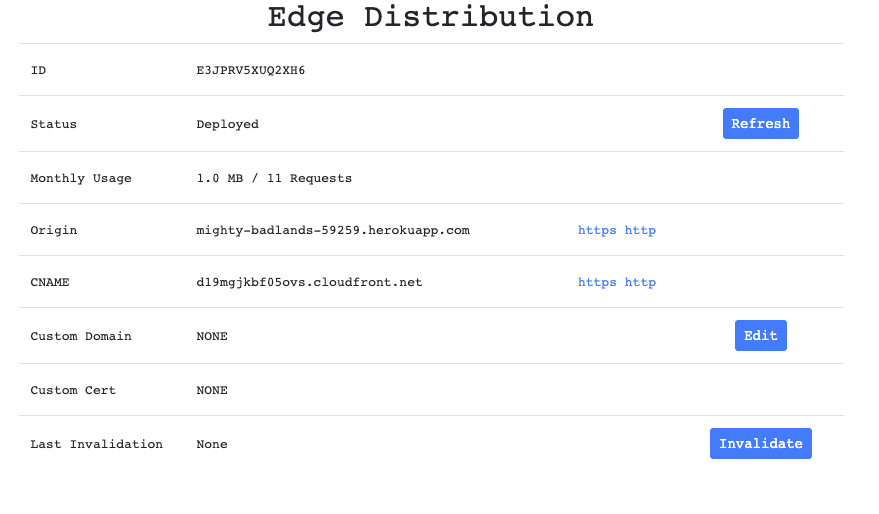
which will open the proper URL in the browser where you can see the activitity of this layer and configure a few things
And for the HTML response, does Cloudfront support state-while-revalidate? If not, I guess my recommendation would be to set the expire to 5 minutes or so, but I would explain that in the docs so people can set it themselves.
juanma5
I’ve discovered this tool → httpstat
that allows you to view the server response times in an easy way
Maybe the solution here could be creating a custom server uses server.js as middleware and proxy requests by adding the proper headers in the responses (but this adds complexity to the whole workflow so having a way to customize headers directly from frontity would be the way to go here)
And yes, this whole thing about Cache layers, headers involved and how to set them is something that needs to be explained very well as it is an important part of the Frontity Architecture.
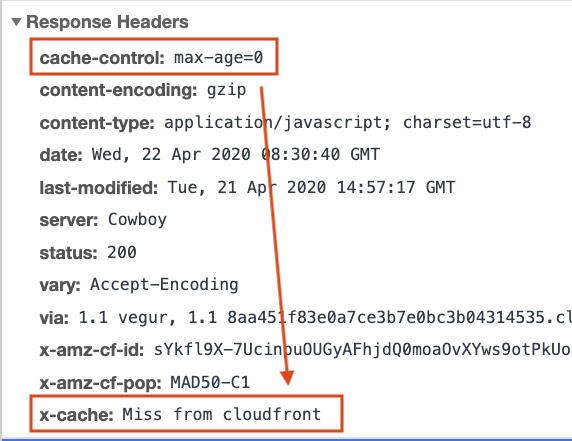
Yes, Frontity is not adding any cache-control headers as of today.
We didn’t add them because we thought about adding a @frontity/headers package, but it requires first the server extensibility and that is not ready yet.
I guess that we could add default cache-control headers until that is added… no-cache for the server and immutable for the static assets for the hostings like Heroku that don’t have a way to add them.
But, is there a way to configure those headers in Cloudfront for now? Do you know why is it caching the HTML but not caching the static assets? What configuration options does it give you (if any)?
juanma10
I’m going to discard this way of adding a CDN for now, because:
Edge is creating a Cloudfront distribution but the way to configure Cloudfront from that plugin is kind of complex, limited and not very well documented
Maybe configuring a CDN layer with a service like KeyCDN is a better option to start with
luisherranz14
I think Fastly may be a good option too, because it is free up to $50 (as far as I know).
I still prefer KeyCDN though, because it works great with stale-while-revalidate. But for a medium/large site, state-while-revalidate is not really useful.
luisherranz15
@juanma could you please remind me what do you need from me here? Some insight on how to configure KeyCDN?