The team is now working on the WordPress Interactivity API. This unblocks the same UX Frontity framework enabled but directly in WordPress Core, fully compatible with the new Site Editor.
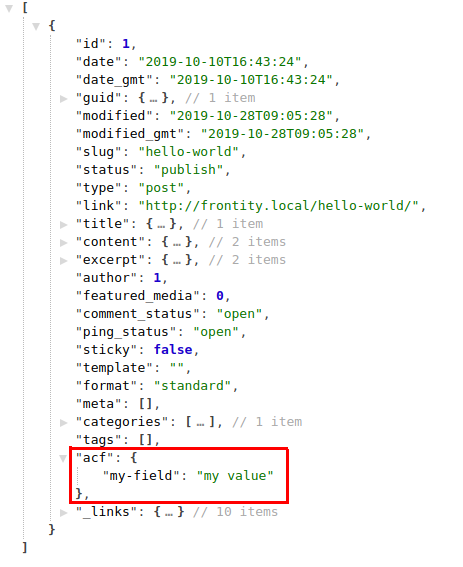
The plugin you mention adds the custom fields data to the REST API response of the post type they are attached to. For example, if you add a custom field to post, let’s say, my-field, this custom field will be returned along with the post data when fetching a post.
As Frontity doesn’t modify the REST API response, the ACF info will be available in the same property it comes.
const data = state.source.get("/hello-world/");
const post = state.source[data.type][data.id]; // This is the REST API response

const myField = post.acf["my-field"]; // The ACF info is in the same place.
I hope I’ve helped.
Greetings.
1 Like
countfak3
Hi David, thank you for your reply.
Everything sounds clear, the point is that the custom fields inside the Options page are usually available globally so you can access them from every page: I never directly fetch the Options page so that I can access its custom fields from it, that’s not even possible as far as I know.
Maybe I’m missing something, I will keep on trying, but some real-world examples would be helpful.
Thanks!
David5
Hi again!
I misunderstood your question, sorry. You are right, you cannot use actions.source.fetch directly to fetch the ACF options page as it isn’t a post type with a public URL pointing to it. However, you can already do that writing your own handler to accept some custom pattern to retrieve that data. Handlers are the piece of code that decide what must be requested from WP and stored in the Frontity state (more info on handlers here). It would be something like this:
// Fetch the `options` page (if it isn't fetched yet).
await actions.source.fetch("acf-options-page");
// Get the fetched data stored in state.
const data = state.source.get("acf-options-page");

// You will have in `data` something like:
// data = {
//   isAcfOptionsPage: true,
//   acf: { /* custom fields */ }
// }
I’m not sure if this would work in your case because ACF Options Page seems to be a per-pay feature and I haven’t tested it, but give it a try and let me know if it worked!
BTW, we are improving the design of how to fetch non-URL data from the REST API using actions.source.fetch (like your case), as there is some trouble (specially with error handling).
Cheers.
2 Likes
countfak6
Hi again David,
I’m getting this error: Can not use keyword 'await' outside an async function
It’s related to this part:
I’m not sure I understood the “wherever in your code” part.
Thanks a lot for your help.
luisherranz7
If you need that data to be accessible for all the URLs, you can do the fetch in the beforeSSR action:
const marsTheme = {
  name: "@frontity/mars-theme",
  roots: { /* ... */ },
  state: { /* ... */ },
  actions: {
    theme: {
      beforeSSR: async ({ state, actions }) => {
        // This will make Frontity wait until the ACF options
        // page has been fetched and it is available
        // using state.source.get("acf-options-page").
        await actions.source.fetch("acf-options-page");
      }
    }
  },
  libraries: { /* ... */ },
};
By the way, we are no experts in ACF. Are there more endpoints that don’t belong to a post/taxonomy like this one?
I’m asking because if that’s the case, maybe we could do a Frontity package that adds all the needed handlers.
2 Likes
countfak9
Hey Luis,
works like a charm now. Thank you.
I don’t know if there are other endpoints like Options that need some custom code in order to get them.
Every other ACF custom field is added to the REST API response of the post type they are attached to, as David mentioned in his first post.
Options Page is a very popular addon for sure and it’s part of the PRO version of ACF. You should definitely take ACF into consideration while developing Frontity.
Great job by the way.
Cheers
1 Like
luisherranz11
Thanks Marco! I’m glad it worked. We need to create better guides of beforeSSR.
Pablo12
Hey @countfak we would love to see what you are building once it’s ready! I invite you to post it here /c/showcases
hammad13
const marsTheme = {
  name: "@frontity/mars-theme",
  roots: { /* ... */ },
  state: { /* ... */ },
  actions: {
    theme: {
      beforeSSR: async ({ state, actions }) => {
        // This will make Frontity wait until the ACF options
        // page has been fetched and it is available
        // using state.source.get("acf-options-page").
        await actions.source.fetch("acf-options-page");
      }
    }
  },
  libraries: { /* ... */ },
};
I have already created one anther customHandler to fetch menu and Its already in the beforeSSR. Now I want to add handler for ACF fields. How can i add multiple fetches against beforeSSR by creating list against beforeSSR key in state.actions.theme.beforeSSR which is in the ./src/index.js?
can you please confirm? Thanks
what if one promise gets fail? Don’t they all stop? Or Try-Catch is handled effeciently?
luisherranz16
Yes, it throws, and yes, you can use try/catch
Promise.all is a standard API of Promise, but there are lots of npm packages to do this in slightly different ways, doing races, using objects with keys, delaying the rejection until all them finished and so on.
1 Like
hammad17
Thanks everything clear now.
bhagvan.vrinsofts18
Hi Friends,
I have use ACF Options data in this format : /wp-json/acf/v2/options/